Showing posts with label Computer. Show all posts

Friday, 7 January 2011

What is a Database SQL?


What is A Database?

Databases are also considered containers. They hold the objects that make up your server’s purpose in life. Tables, views, indexes, and stored procedures are all objects that reside in your database. You can, and often will, have multiple user-defined databases residing on your server. These databases are where the production information and code reside. Other databases are installed on your server to give it the intelligence it needs to function; I will cover these databases in a few different areas throughout the book. However, our focus will be on setting up a production system, not on the inner workings of Microsoft SQL Server.

One of the most common mistakes new users make is to confuse the device and the database. You place your databases within your devices. To understand this, think of a database as a division within your company. For instance, Human Resources deal with very specific kinds of information, so you would logically put all of that type of information in a container for centralized management and access control. Accounting is an area that often requires more security than others, and the information generated from this area would justly be placed in a separate container for security reasons. You would not scatter information for the Human Resources department throughout all the offices; instead, you would put all those functions and resources in one place. The same applies to databases and good database design.

An interesting point for all PC-based database programmers is that Microsoft SQL Server does not store the information or data in the database. Remember, the database is a container. Instead, the server stores your data in a table. The index you create for fast access to data is not stored in the table with the raw data; it is stored as another object within the database. A database is a collection of objects. This concept is not hard to follow, but it is different enough from the organization of other database programs that it is sometimes a stumbling block for the small-system programmer. An MIS department accustomed to dBASE or Microsoft FoxPro databases will struggle with this at first. Since this structure is common to most large database systems today, you should become familiar with it.

In addition, you should focus on the database level when administrating your system’s security. Your users will be granted a logon ID for connecting to the server, but this does not allow them to get to the data they need. This is done by adding users and groups to each database individually on a need-to-know basis. This method of security keeps unwanted users from browsing where they should not while allowing others to do their jobs.

Returning to the office analogy, let’s compare a database to the Accounting department in your company. This department might have a door you must pass through, and once you pass through that door, you would see all the cubicles and desks where the actual work is done. This door might be locked in the evening or even require a passkey to enter during the day.

The same idea can be applied to a database. The records and files are not strewn around the office; they reside in filing cabinets and in folders or ledgers for ease of access. These organizational tools can be related to Microsoft SQL Server objects. You use tables, stored procedures, and indexes to find what you need when you need it.

The security model that Microsoft SQL Server uses is also similar to the passkey entry requirement. No one gets access without a valid key or password. I will not try to recommend a security method here because of the diverse requirements in the market today. However, I will say that Microsoft SQL Server will accommodate a strict security model very well and still allow for the simple, trusting models required by smaller companies growing into Microsoft SQL Server.

During installation of Microsoft SQL Server, you will not be concerned with these divisions or security, but you should make a few assumptions on the amount of disk space you will need to accommodate these areas and how you will accommodate these needs.

What is a Device in SQL?


What Is A Device?

The terms device and database are often confused. The basic storage container for Microsoft SQL Server is a device, which is an operating system file that resides on the physical disk, or hard drive, of the server. A device is the container that allocates space to Microsoft SQL Server on the server’s hard drive. Microsoft SQL Server does not acquire disk space on the server dynamically. You must specify the amount of disk to set aside for it to use. This allocation is accomplished through the device. 

The space that you set aside for devices is essentially lost to the rest of the machine. A device cannot be made smaller. You can, however, expand a device to make more room for your databases to grow—provided you have enough free disk space. You can—and will—have multiple devices on your server. Databases can span multiple devices to accommodate their growth. A device carries with it a file extension of .DAT. This is important to know if you are in a multiple-programmer environment and are using the data server for file services as well as data services. For example, in File Manager or Windows NT Explorer, note the physical file C:\MSSQL\Data\master.dat. You can highlight this file, hit the Delete key, and if it is not currently being used by Microsoft SQL Server, it will be deleted like any other file. If it is in use, Microsoft SQL Server and the operating system will not allow it to be deleted.

This prevents an accidental delete. The only acceptable way to recover the space given to a device is to drop the device and re-create it with a smaller size. When you drop a device, ensure that you go to the file system and delete the physical file. If you do not remove the device file, you will receive an error message when you re-create the device with the same name. Once you remove the file, you use the Enterprise Manager to re-create the device with a smaller size. You can then restore any contents of the old device to the new device, provided all the objects fit in the new space.

Try to avoid creating one big device that takes up the whole hard drive. Doing so will not give you the flexibility you need from the server. You will be very limited in your options down the road and will have to jump through some fairly complicated hoops to change this configuration on a production machine.

From a slightly different perspective, a device can be thought of as a large, empty office. This space is rented or leased by your company. If your business expands beyond the square footage you have set aside, you must acquire more office space to accommodate the growth. This can be achieved by expanding the existing office into adjoining space in the same building or perhaps in another office building altogether.

This growth scenario applies to your devices as well. I will use this and other analogies a lot throughout this book to help you associate Microsoft SQL Server to a real-world example. Many of my students have found they frequently do not remember the exact piece of information they need but can draw on these analogies to figure out what to do.

Wednesday, 22 December 2010

DeepunFreezer 1.6 Unicode Edition

  This DeepUnfreezer is tool that can change status of DeepFreeze whether is Frozen, Thawed, Or Thawed after next few restart, of course without any password needed :).


Okay, now lets we talk about DeepFreeze,

Deep Freeze is a kernel-level driver that protects hard drive integrity by redirecting information being written to the hard drive or partition, leaving the original data intact. This redirected information is no longer referenced once the computer is restarted, thus restoring the system to its original state at the disk sector level. This allows users to make 'virtual' changes to the system, giving them the appearance that they can modify core files or even delete them, and even make the system unusable to themselves, but upon reboot the originally configured 'frozen' state of the operating system is restored.

To make changes, a system administrator must 'thaw' the protected partition by disabling Deep Freeze, make any needed changes, and then 'freeze' it again by re-enabling Deep Freeze. These changes become part of the protected partition and will be maintained after restarts. 'Freezing' and 'thawing' can be done at the workstation level or remotely via either the Faronics Core management platform or the Deep Freeze Enterprise Console. Users of the Enterprise version can also create virtual partitions called ThawSpaces (of up to 1 TB on an NTFS-formatted drive) to retain data on "frozen" hard drives after restarts.

Deep Freeze can also protect a computer from harmful malware as it automatically deletes (or rather, no longer 'sees') downloaded files when the computer is restarted. The advantage to using Deep Freeze as an antivirus/antimalware application is that it uses almost no system resources, and does not slow down the computer noticeably. The disadvantage is that it does not provide real-time protection, therefore an infected computer would have to be restarted in order to remove malware.


Wednesday, 15 December 2010

Careful for buying a blackberry in Indonesia


Be careful buying Blackberry. Although the boxes are still sealed, the BlackBerry that you buy is not necessarily new. In order not to be fooled, read the instructions below.1. Buy product bundleAccording to the Corporate Communications Telkomsel Suryanda Stephen, the safest way is to buy a BlackBerry handset that official warranty BlackBerry partner operators in Indonesia such as Telkomsel, Indosat, XL, Axis and Tri. Another alternative is to buy at authorized dealers BlackBerry like Teletama Artha Mandiri.2. Know your termsIf you must buy the BlackBerry handset outside operators, you should recognize the term brand new in box (BNIB), 14 days, refurbished and used (second). BNIB means the phone is really new and still in sealed packaging. BlackBerry 14 days is a new item is returned buyer for a reason. BlackBerry 14-day packs typically are not sealed and open. While the refurbished BlackBerry handset is packed with the re-casing, boxes and other equipment like new. And the former is a BlackBerry phone that had been used. Before buying, check the status of the phone to the seller because it will affect all of the selling price.3. Note the PIN and IMEIMake sure the PIN number and IMEI that is on a BlackBerry handset with a PIN and IMEI on the cardboard packaging. To view the PIN and IMEI on the BlackBerry handset can be viewed on the sticker on the back after the battery is removed or through the menu Option-Status/Alt + Cap + H.4. Check-status menu optionTo check if your BlackBerry is really new and not refurbished, turn on the BlackBerry, go to the menu Option-Status. After that, type BUYR. On the menu will appear "Data Usage" and "Voice Usageâ". If the phone is still new, "Data Usage" and "Voice Usage" will contain zero or close to 0. If the numbers that appear relatively still small, eg 2.5 Kb, the BlackBerry may be opened to unlock needs.

Tuesday, 30 November 2010

Google Launching Google Maps 6


GOOGLE launched the latest version of Google Earth 6 for Windows, OS X and Linux, on Monday (29/11). Google Maps Street View is now integrated into Google Earth.

'Pegman' (little feature that represents your position in Street View) located next to the Google Earth navigation controls, which when it was released exactly as found on Google Maps.

Some added features such as trees in 3D animation, drawing a more integrated way, and the ease of finding images old location. For example, we could see the imagery of Warsaw in 1935, London in 1945 and Port-au-Prince, Haiti prior to the earthquake affected. In addition, these additional features can be used in navigation go to direct search.

This latest Google Earth can find locations when you little, visiting areas that have not been visited, or search for a holiday location with a more realistic picture

Saturday, 13 November 2010

Western Digital Launch Largest Harddisk


Western Digital (WD) is known as one of the companies participating in the trafficking of hard drives and a pioneer in data storage will soon release a new product in Jakarta, Wednesday (22/12).

Products labeled with 3 TB WD Caviar Green said the performance of the SATA (Serial Advanced Technology Attachment) drive with the largest capacity in the world. The specification has to offer is claimed to provide the ideal solution to the limited capacity of 2.19 terabits.

WD previously led the SATA products from 6 gigabits per second with a capacity of 250 gigabytes to 2 terrabit.
The capacity is capable coupled with a series of chipsets and motherboards SATA 6 Gb per second disiyukan go on the market in the coming months.

Also in the launch of the WD Caviar Green drive manufacturer 3 TB hard drives will also offer the new format with the latest technology which they call tech formats

Friday, 12 November 2010

Mozila Group Launching "F1"


Mozilla Messaging group launched a new feature for Firefox, that is F1. That feature allows users to share content on social networking sites.

For the explorer web site, the "share this" ™ contained in the web content is sometimes confusing. Well, F1 provides a framework of all-in-one on top of the content they see. Once the account is connected, users can simply click the tiny icon in the toolbar F1 and a variety of pages viewed by your friends on Facebook, Twitter and Gmail.

As quoted from mashable.com, shared with the F1 is more secure, simple, easy and nice views. Currently F1 still remains to be developed. Mozilla designer Bryan Clark wrote in his blog, the system must know the various services you use and offer to use it.

''Further, content sharing is not a standard activity so that the user agent takes a number of protocols to offer services to users,''he said.

Friday, 5 November 2010

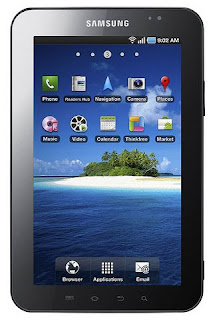
Samsung Galaxy Tab Power Consumption Tips


Traveling out of town could be disastrous for computer users tablets Samsung Galaxy Tab if you forget to bring the charger. In these conditions, you seemed to be forced to conserve battery consumption. Want to know how? Read the following tips.

1. Close unused applications

Running multiple applications simultaneously making wasteful battery consumption. For battery-efficient, close applications that are not being used with a back key. Rather than the home key, more efficient battery.

2. Turn off auto sync

Turn off auto sync after adjust your Google account. To enable that feature, you can select Settings, then Accounts and sync, and sync manually when needed.

3. Turn off bluetooth and wifi

In light conditions, bluetooth and wifi participate in making the battery so wasteful. Therefore, turn off bluetooth and wifi when not in use.

4. Restart phone

If the battery consumption is excessive or phone function can not be used, restart the phone by pressing the power key for 7.5 seconds or press and hold the power key, and select power off.